

Faculties
Keep your academic structure clear, consistent, and connected
The Faculties module helps HE and FE teams maintain a centralised list of academic faculties and departments, ensuring recruitment activity is properly organised and reported.
Faculties connects with Courses and Subjects, Event Manager, Pre-Applicant Open Days, Applicant Open Days, and Student Database, keeping events, reports, communications, and student records aligned to the right area of study.
What is Faculties?
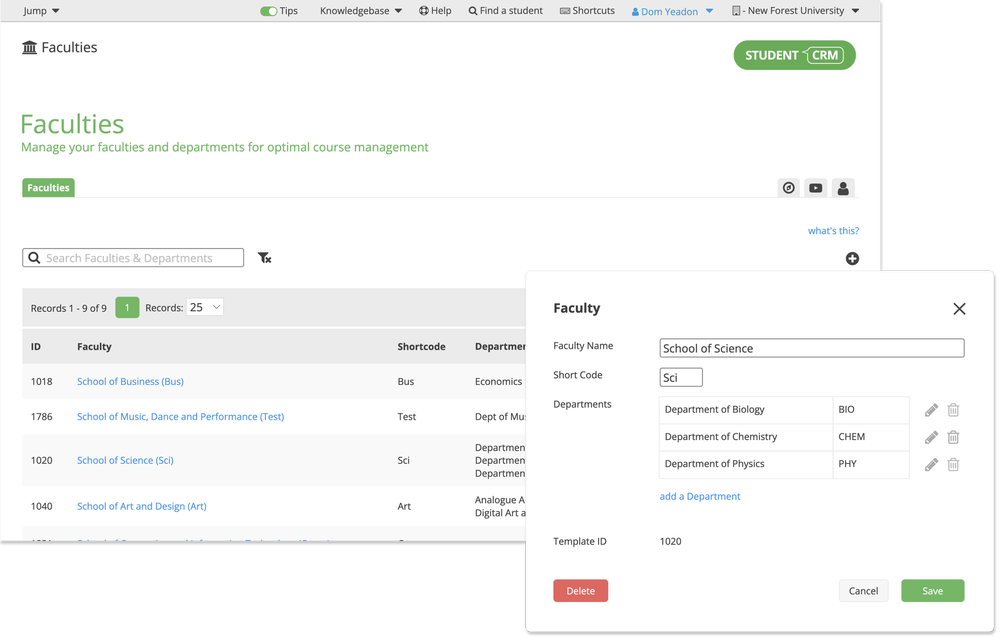
Faculties is a Student CRM module that helps universities and colleges organise academic faculties, departments, subjects, and courses for recruitment, admissions, events, segmentation, and reporting. It acts as a back-end academic structure so teams can connect student records, courses of interest, open day activity, communications, and reports to the correct faculty or department.
Everything you need to organise recruitment activity by faculty
Course organisation
Assign new courses to the correct faculty and department for better structure and reporting across the CRM. This keeps your Courses and Subjects data easier to manage and reuse.
Targeted segmentation
Easily build groups such as “School of Business” students to send tailored communications, invite specific cohorts to events, or track faculty-level engagement through tools such as Campaign Manager.
Required for events
The Faculties module is essential for Pre-Applicant Open Days and Applicant Open Days, ensuring each activity is correctly linked to its relevant faculty or department.
Detailed reporting
Report on recruitment activity by faculty, department, subject, and course, giving teams visibility into performance and participation across the university or college.
Faculty events
Connect open day dates to specific faculties to run targeted sessions, ensuring students meet the right academics and explore relevant courses through connected event tools such as Event Manager.
Integrated structure
Faculties works directly with Courses and Subjects, Student Database, and event modules, ensuring your academic hierarchy stays consistent everywhere it is used in Student CRM.
Faculties FAQs
Common questions about using Faculties to organise academic departments, connect courses, support open days, manage course-of-interest data, and report on recruitment activity by faculty or department.