

Calendar
Keep every recruitment activity aligned, visible, and up to date
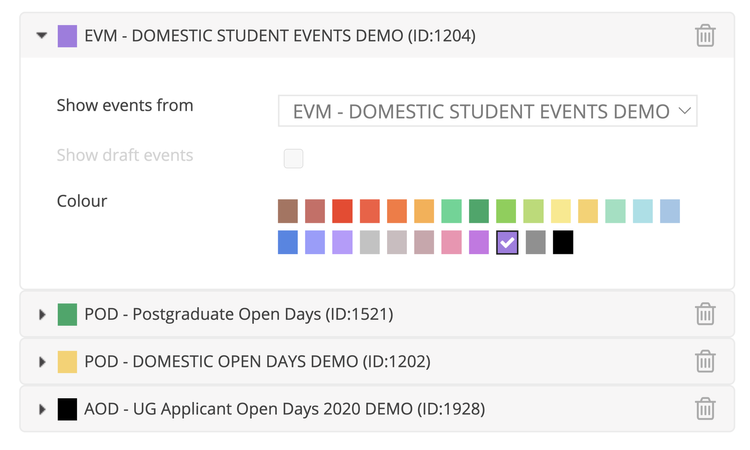
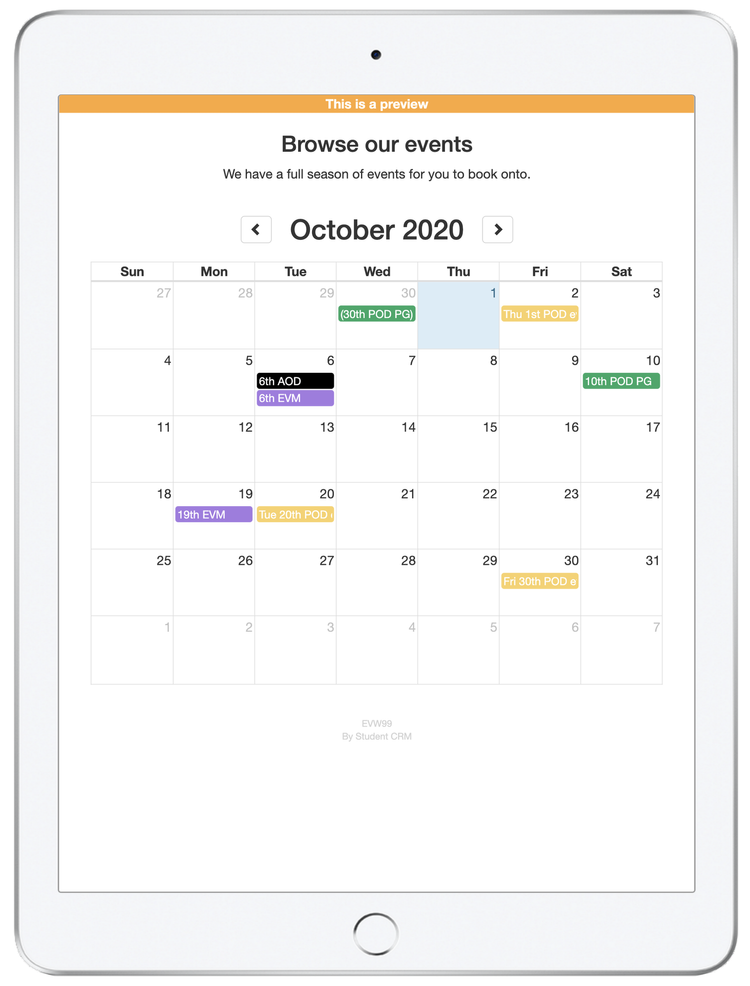
With so many recruitment activities happening across your teams, keeping everything aligned and accurate is essential. The Calendar module gives you a real-time feed of Student CRM events, automatically updating your website and syncing directly into your team’s calendars.
One or more calendars can be fed directly from Event Manager, Pre-Applicant Open Days, and Applicant Open Days, saving time and ensuring accuracy without double handling.
Read video transcript
With so many recruitment activities happening across your teams, keeping everything aligned and up-to-date
is essential.
The Calendar module gives you a real-time feed of Student CRM events - automatically updating your website
and syncing into your teams' calendars.
One or more calendars can be fed directly from Student CRM, saving time and ensuring accuracy without double-handling.
The Calendar module has the following benefits:
Live website calendar
This is where the Calendar module really earns its place.
By embedding a live calendar on your website, prospective students and staff always see the most accurate recruitment
events - without you ever needing to touch the site.
Spot a typo?
Change the time?
Shift the open day schedule?
Make the update in Student CRM, and the calendar reflects it before you've even loaded the web page.
No lag.
No duplication.
No bottlenecks.
Just reliable, real-time event visibility that saves your team hassle and gives your website visitors the
smooth experience they expect.
Subscribable calendars
Each team can create their own private calendar using events from modules like Event Manager, Pre-Applicant
Open Days, Applicant Open Days, or Mobile Event Capture.
Staff can subscribe to feeds in Outlook, Google Calendar, or their preferred tool.
Updates sync regularly - so Student CRM remains your single source of truth.
Everyone has access to the same information, and when changes are needed, links take them straight back
into the CRM to edit.
Teamwide Visibility
No more version control issues, email chains, or last-minute confusion.
With shared calendars, teams stay aligned - and managers gain full transparency into every scheduled activity.
If someone's off sick or leaves unexpectedly, their plans don't vanish.
It's all there, visible and accessible - helping you stay on top of every event without the usual scramble.
By using the calendar module you can stay organised and keep everyone aligned.
A single source of truth for every recruitment event - live on your website, synced to your calendars, and
updated where it matters most.
Book a call with one of our CRM experts and see how a live calendar keeps your whole team in sync.
What is Calendar?
Calendar is a Student CRM module that helps HE and FE recruitment, outreach, events, and marketing teams keep student recruitment activities visible and up to date. It can publish live event calendars to your website, create subscribable feeds for Outlook or Google Calendar, and keep event information synced from one central CRM record.
Everything you need to keep events organised, visible, and in sync
Live website calendar
Embed a real-time calendar on your website that updates automatically.
- Prospective students and staff always see the latest event details.
- Edit once in Student CRM and changes appear online.
- No duplication, manual updates, or out-of-date event pages.
Subscribable calendars
Give every team their own synced view of key recruitment events.
- Create feeds from Event Manager, Pre-Applicant Open Days, or Applicant Open Days.
- Subscribe via Outlook or Google Calendar.
- Updates sync regularly, keeping everyone on the same page.
Team-wide visibility
Eliminate confusion and keep recruitment plans transparent.
- Shared calendars show every scheduled activity in real time.
- Managers can see what is happening across teams at a glance.
- If someone is off sick or leaves, plans remain visible and accessible.
One source of truth
Keep all recruitment event data connected to the same central CRM system.
- Student CRM remains the master record for your activities.
- No version control issues or missing event details.
- Ensure accuracy across websites, calendars, and internal tools.
Simplified coordination
Reduce the admin load and keep communication smooth across teams.
- Automatic updates save time and prevent missed changes.
- Everyone works from the same reliable schedule.
- Fewer email chains, fewer mistakes, and better collaboration.
Calendar FAQs
Common questions about using Calendar to publish live event calendars, sync internal team calendars, manage public and private event visibility, and keep Student CRM event data consistent.