

Contact Manager
Manage every external relationship in one connected place
Supporting prospective students in your Student Database and applicants in Applications Active is at the heart of what you do. But great recruitment also depends on maintaining strong relationships with the wider network that supports them; teachers, parents, partners, graduates, alumni, and employers.
The Contact Manager module brings all those connections together in Student CRM. It helps outreach, alumni, partnerships, international, and business development teams keep every contact organised, accessible, and ready for meaningful engagement.
Read video transcript
In every institution, the primary focus is managing relationships with prospective students and applicants.
But to do that well, there's a wider network of stakeholders you also need to support.
The Contact Manager module helps you do just that.
From outreach, school liaison, and alumni teams staying connected with teachers, parents, partners, and graduates,
to business development teams engaging with employers and community stakeholders.
Keeping all of those relationships organised, accessible, and in one central place is essential, so you can
easily communicate with them.
The Contact Manager module has the following benefits:
Seamless contact capture
Whether it's a teacher requesting a visit or a careers advisor signing up for your newsletter, built-in forms
make it quick and easy to create new contact records.
Forms can be embedded anywhere and customised to collect exactly the data you need, meaning you've got clean,
actionable data, ready to use.
Lead and Opportunity management
Track every relationship from initial contact to long-term engagement - whether it's a school arranging a visit,
an employer exploring partnerships, or a graduate reconnecting with your alumni team.
Store everything from roles and communication preferences to activity history and organisational links, so your
team always has the full picture.
Assign ownership, track progress, and stay on top of opportunities without duplication or forgotten
follow-ups.
With everything logged and visible, no opportunity slips through the cracks.
Activity tracking and outreach reporting
Say goodbye to the spreadsheet!
We know it's there - every team has one.
Buried in a shared drive, colour-coded by someone who left two years ago.
But when it comes to tracking outreach and engagement, spreadsheets can only take you so far.
Contact Manager replaces guesswork with live, shared records linked to real people and organisations.
Whether you're visiting schools, attending careers fairs, or hosting school visits on campus, interactions
are logged and connected to the relevant organisation.
Track how many students you engaged with at a particular school, monitor follow-up activity, and see whether
those interactions led to applications or enrolments.
It's a powerful way to understand what's working, demonstrate ROI to stakeholders, and strengthen your
outreach strategy over time.
And there's more:
Bulk emails and SMS
Whether you're keeping careers advisors up to date, sending newsletters to teachers or heads of sixth
form, keeping alumni engaged after graduation, or updating key partners about the upcoming academic
year - Contact Manager makes it simple.
Upload contact records or collect details using web forms, then manage everyone in one place.
With bulk email and SMS built in, your team can reach the right people with the right message, fast - no
exporting, no mail merges, no using outlook and crossing your fingers.
Just select your audience, write your message, and send.
Automated messaging
For the messages you send often, like confirmations, follow-ups, or newsletters - autoresponder sequences
have you covered.
Triggered by segments, they handle replies automatically, so communication stays consistent without adding to
your to-do list.
It's communication made easy, with tools that work quietly in the background so your team doesn't have
to.
With Contact Manager, your outreach, alumni, and external relations teams can manage contacts, nurture partnerships,
and communicate more effectively - all from one place.
Book a call with one of our CRM experts and see how Contact Manager can support your wider engagement
strategy.
What is Contact Manager?
Contact Manager is a Student CRM module for managing external relationships across schools, employers, partners, parents, graduates, alumni, and other non-student contacts. It helps HE and FE recruitment, outreach, partnerships, alumni, and international teams capture contacts, track activity, view communication history, and send targeted follow-up messages from one connected place.
Everything you need to manage relationships, track activity, and stay connected
Seamless contact capture
Create and manage new contacts quickly and accurately using connected forms and structured data.
- Use Web Form Builder forms to capture teacher, parent, partner, alumni, and employer details.
- Embed forms anywhere and customise them to collect the right data.
- Create clean, structured contact records that are ready to use straight away.
Lead and opportunity management
Track every relationship from first interaction to long-term engagement.
- Log communication history, roles, and linked organisations.
- Assign ownership, set reminders, and monitor progress across teams.
- Avoid duplication and make sure no relationship or opportunity is missed.
Activity tracking and outreach reporting
Replace disconnected spreadsheets with connected, live relationship data.
- Record school visits, fairs, meetings, and outreach interactions in one place.
- Connect outreach activity with prospective student data, applications, and enrolments.
- Demonstrate ROI and refine your outreach strategy using real evidence.
Automated messaging
Save time on the messages your team sends most often.
- Use autoresponder sequences for confirmations, follow-ups, newsletters, or event-related updates.
- Trigger communications based on segments, contact type, or activity.
- Keep messaging consistent and reliable without manual effort.
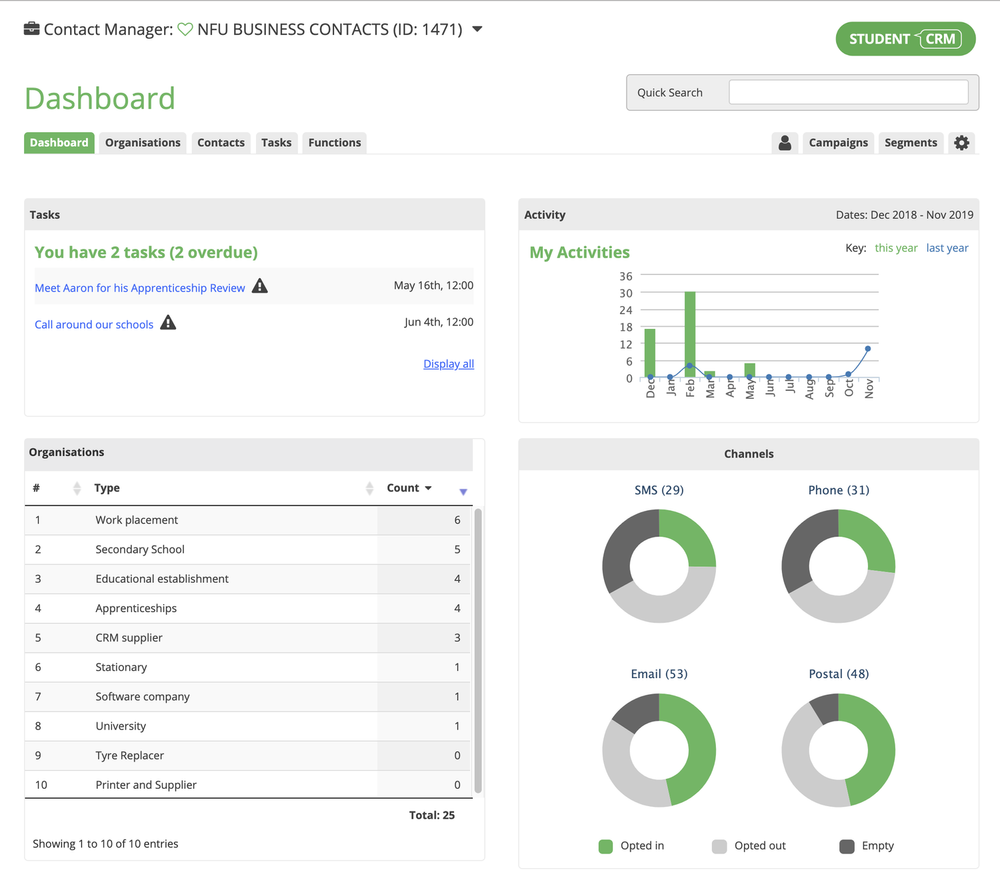
Bulk email and SMS
Reach your external audiences quickly and effectively without exporting data into another system.
- Send updates to careers advisers, teachers, alumni, employers, agents, or partners.
- Manage communications in one central system alongside Campaign Manager.
- Avoid exporting, mail merges, duplicated lists, and disconnected tools.
Centralised communication
Contact Manager keeps every team aligned. Outreach, alumni, partnerships, international, and business development teams can manage contacts, nurture relationships, and communicate confidently from one connected platform.
- See the full context before following up.
- Share relationship history across departments.
- Use Student CRM as the single source of truth for external engagement.
Contact Manager FAQs
Common questions about using Contact Manager to manage school relationships, employer links, alumni contacts, partner organisations, outreach activity, and group communications inside Student CRM.