

Regions
Organise global recruitment with regional clarity
The Regions module helps international teams group countries into defined regions such as Europe, Asia, or Middle East and North Africa, so student data, communications, and reporting all stay consistent.
By assigning each country to a region, your team can segment students, target messaging, and manage enquiries or applications by geography. For wider Student CRM context, related areas include Student Database, Enquiries, Applications Active, and Campaign Manager.
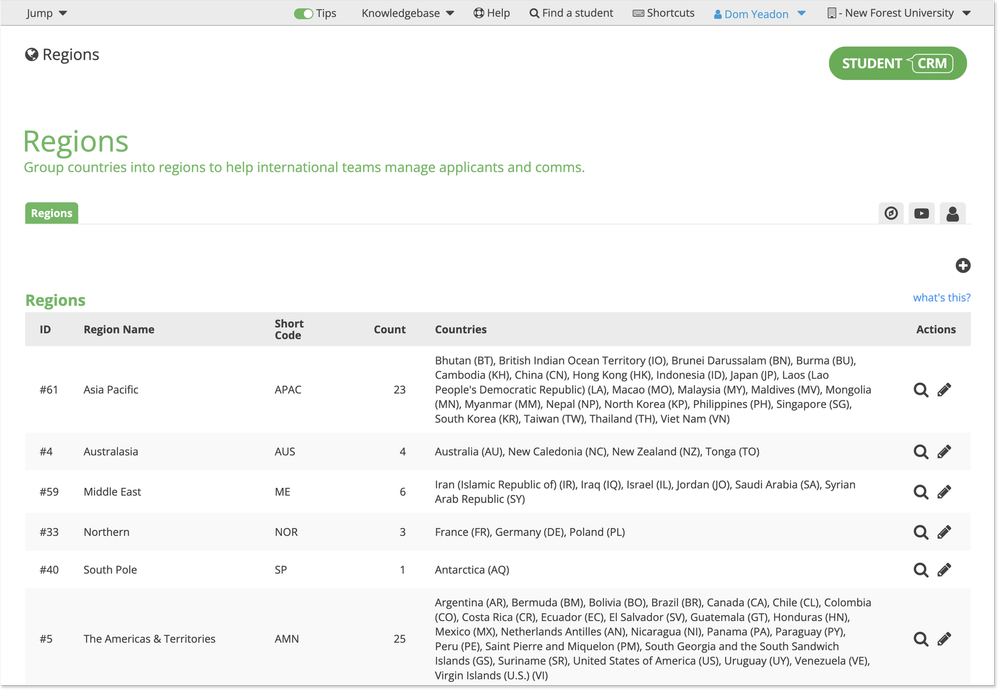
What is Regions?
Regions is a Student CRM module that helps universities and colleges group countries into recruitment regions for segmentation, reporting, task ownership, and international communication planning. It gives international, admissions, and recruitment teams a clear regional structure for managing prospective student enquiries, applications, touchpoints, and campaign audiences by geography.
Everything you need to manage international recruitment efficiently
Targeted communications
Use regional groupings as Touchpoint conditions or segment criteria to send students relevant updates, event invites, or next-step messages relative to their Region and your regional communication strategy. For related communication planning, see Campaign Manager.
Dashboard reporting
See exactly how many applications are coming from each region using application reporting for quick insight and performance tracking. For related application workflows, see Applications Active.
Team organisation
Assign tasks and ownership to the right regional teams, helping staff manage enquiries and applications from their allocated countries in a structured, transparent way.
Flexible setup
Create as many regions as you need. Your team defines which countries belong to which region and what to name each one, keeping your setup flexible and aligned to your institution’s international strategy.
Consistent coordination
By organising countries into regions, international and admissions teams can manage student data, communications, and follow-ups with confidence and consistency. Related areas in Student CRM include Student Database, Enquiries, and wider recruitment workflows.
Regions FAQs
Common questions about using Regions to group countries, segment prospective students, report on international recruitment activity, and manage regional ownership inside Student CRM.