

Template Builder
Create consistent, on-brand emails across every team and campaign
Thousands of students, multiple teams, and more emails than anyone can count. Keeping every campaign, event invite, and admissions message polished and on brand shouldn’t be a full-time job.
Template Builder makes it easy. It gives you one central library of approved email templates, ready to use across every part of Student CRM. Whether it’s a quick update, a newsletter, or an admissions follow-up, every message looks great, feels consistent, and stays on brand, all without needing a developer.
Read video transcript
Thousands of students, multiple teams, and more emails than anyone can count - keeping everything polished and on-brand shouldn't be a full-time job.
Template Builder makes it easy.
It gives you one central library of approved email templates - ready to use across everything you do within Student CRM.
So whether it's a quick update, a beautiful newsletter, or a follow-up from admissions, when your team sends an email (either automatic or manually), it will look great, feel consistent, and stay on-brand - all without needing to call in a developer.
For students, that means professional, trustworthy communication.
For your team, it means easy builds, confident sending, and no more mystery designs appearing out of nowhere.
The Template Builder module has the following benefits:
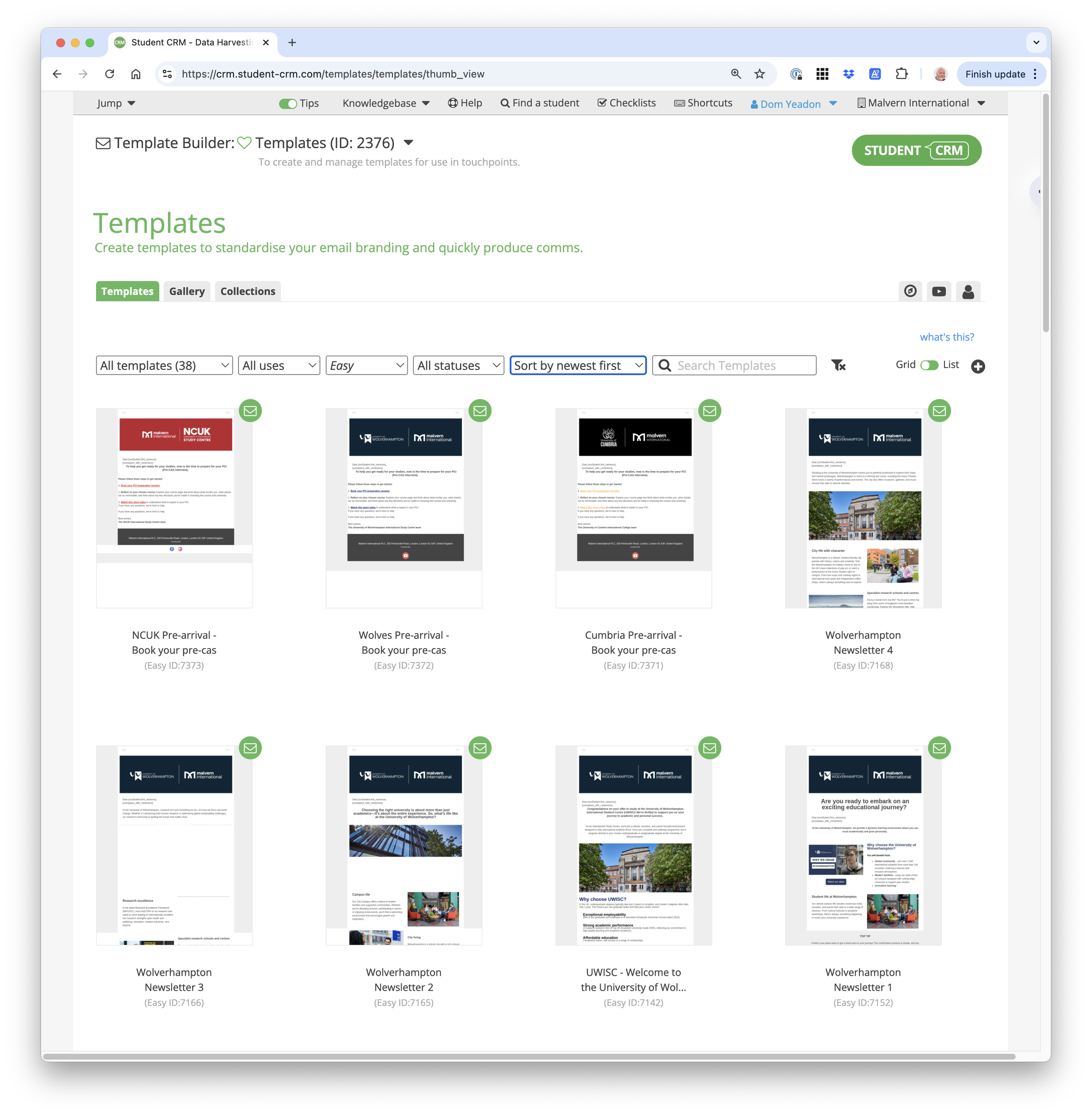
Central library
Store all your approved templates in one place, ready to use across campaigns, touchpoints and 1-2-1 emails.
Staff save time hunting for "the latest version," and students get consistent, professional emails - no matter which team sends them.
Classic or Easy Builder
Choose the tool that fits your team.
Use Classic templates for full HTML control or switch to Easy Builder for an intuitive, drag-and-drop editor - perfect for fast creation without needing support from your IT team, a developer, or knowing how to code yourself.
Consistent brand identity
Set institutional colours for quick access, and keep frequently used images in the built-in Image Bank.
Whether you're sending an open day invite or an offer-holder follow-up, every message looks polished, professional, and unmistakably you.
Students get a cohesive, trustworthy experience across every email - and your team never has to waste time copy-pasting brand guidelines or asking, "Does this look right?"
And there's more:
Template management
Share templates with occurrences via collections - for example, one set for open days, another for applicant comms - so your team can easily find and use the right design for each context.
You can also control who can do what within the module.
Permissions stop accidental edits - so no one 'just tweaks a header' five minutes before send and breaks the whole layout.
With clear organisation and permissions in place, your library stays tidy, secure, and easy to navigate.
Bulk updates
Need to make a change?
Update the template centrally and apply those changes across all related touchpoints with just a few clicks.
There's no need to update each email individually - our bulk update tools ensure that your edits are rolled out consistently wherever the template is used.
This saves time, reduces the risk of outdated messaging, and keeps all your communications aligned with the latest branding and content.
With Template Builder, you can design faster, stay on-brand, and keep your messaging consistent - no matter who's sending it.
Book a call with one of our CRM experts and see how Template Builder can help unify your student communications.
What is Template Builder?
Template Builder is a Student CRM module that helps universities and colleges create, manage, share, and update approved email templates for recruitment and admissions communications. Marketing, admissions, events, enquiries, international, partnerships, and recruitment teams can use a central library of branded templates across campaigns, automated touchpoints, event invitations, application updates, newsletters, and one-to-one messages, with drag-and-drop or HTML editing, permissions, and bulk updates.
Everything you need to send professional, consistent, and trusted communications
Central library
Keep every approved email design in one place.
- Store templates for campaigns and touchpoints
- Save time searching for the latest version
- Deliver consistent, professional emails across all teams
Classic or EasyBuilder
Choose the tool that suits your team’s needs.
- Classic: full HTML control for advanced users
- EasyBuilder: simple drag-and-drop editor for fast, code-free creation
- Build professional emails without IT or design support
Confident, cohesive communication
Every email, from event invites to application updates, delivers the same trusted, branded experience. Teams can focus on meaningful communication instead of formatting.
Consistent brand identity
Protect your brand across every communication.
- Set institutional colours for quick access
- Use logos and images from the image bank in Pulse
- Ensure every message looks polished and unmistakably yours
Template management
Keep your library organised and secure.
- Share templates with select module occurrences
- Control user permissions to prevent accidental edits
- Maintain tidy, well-structured libraries that are easy to navigate
Bulk updates
Make changes once and apply them everywhere.
- Update templates centrally and roll out changes across all touchpoints
- Eliminate manual updates and outdated versions
- Ensure branding and content stay current across every message