

Data Manager
Import and validate prospective student data quickly, accurately, and compliantly
Recruitment teams receive data from UCAS fairs, events, contact lists, spreadsheets, schools, partners, and other third-party sources. When information is not collected directly through Student CRM web forms, it still needs a reliable route into the CRM.
Data Manager helps universities and colleges import external recruitment data, validate records, identify existing contacts, and maintain a clean Student Database. Imported records can then be used across enquiries, events, applications, campaigns, and automated student journeys.
Consent information and source details can be retained alongside each record, helping teams maintain consistent data governance through Privacy Centre.
Read video transcript
Recruitment and admissions teams handle data from everywhere: UCAS fair barcode scans, contact lists from conferences, CSV files from partners, and spreadsheets in every format imaginable.
When that information isn't captured directly inside Student CRM through event sign-ups, web forms, or prospectus requests, it still needs a reliable way in.
And if importing it is slow, inconsistent, or non-compliant, it creates more problems than it solves.
That's where the Data Manager module comes in.
It brings all your external data together - fast, accurate, and compliant - keeping every record connected in one system.
The Data Manager module has the following benefits:
Seamless imports
Bring in enquirer data, contacts, courses, or applications from CSV files directly into Student CRM.
Whether it's Mobile Event Capture, Rapid Response, Student Database, or another module, the data flows where it needs to - ready to be actioned straight away.
Third-party integration
Leads from UCAS fairs, professional conferences, and other platforms can all be captured and imported without hassle.
That means one central system instead of juggling multiple databases - and a faster, more consistent follow-up experience for students.
Built-in validation
The import process automatically checks for formatting errors, so corrupt or incomplete files never sneak through.
No more "mystery columns" hiding in your spreadsheets - just clean, reliable data you can trust.
Automated follow-up
Once imported, records can trigger instant follow-up emails using the workflows already defined in the module they feed into.
Students get timely, professional communication, while staff avoid the grind of manual chasing.
And there's more:
GDPR safeguards
Every import comes with compliance checks.
Consents are captured and logged, protecting student or lead privacy and keeping your institution safely within GDPR regulations.
Real-time imports
Bring data into the CRM in real time, so your team can act on new enquiries or applications as soon as they arrive.
The result is quicker reactions and more responsive engagement.
Data management tools
Data Manager also helps keep records clean by merging duplicates and maintaining accuracy.
Reporting improves, insights get sharper, and students enjoy smoother, more joined-up conversations.
With Data Manager, your team can import, validate, and act on data confidently - because everything is clean, compliant, and in one system.
Book a call with one of our CRM experts and see how Data Manager can streamline your student data workflows.
What is Data Manager?
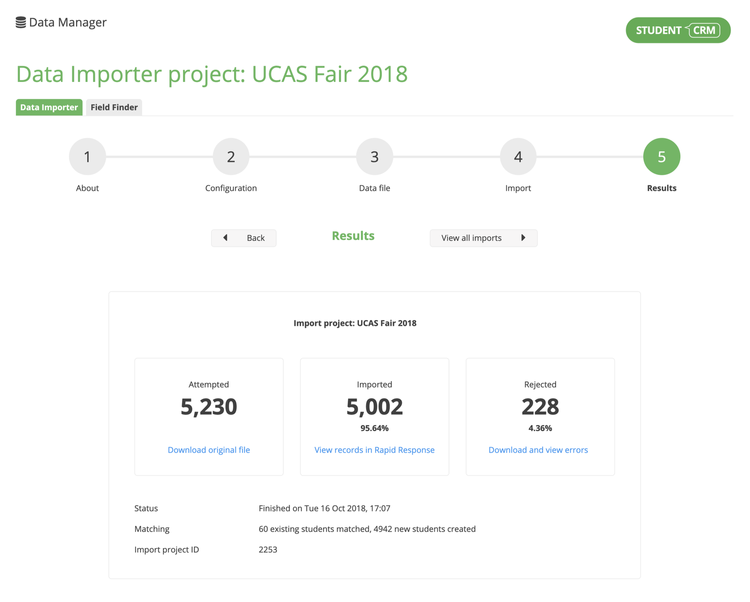
Data Manager is a Student CRM module that helps universities and colleges import, validate, match, and govern prospective student data collected outside the CRM. Recruitment, admissions, marketing, international, data, IT, and compliance teams can bring CSV records from UCAS fairs, events, schools, partners, campaigns, and other third-party sources into the Student Database while retaining source and consent information, reducing duplicates, and preparing records for follow-up, reporting, segmentation, and automated journeys.
Everything you need to import, validate, and manage prospective student data with confidence
Seamless data imports
- Import prospective students, contacts, courses, schools, and related data from CSV files.
- Route imported records into connected modules such as Rapid Response.
- Prepare new records for use without repeatedly rebuilding spreadsheets.
- Retain source and consent information during import.
Automated follow-up
- Start workflows and touchpoints when records are added.
- Send timely follow-up communications without repeated manual intervention.
- Use Automations Manager to apply rules to newly imported records.
- Engage prospective students from the moment they enter the CRM.
Third-party data sources
- Import leads collected at UCAS fairs, conferences, schools, and recruitment events.
- Bring partner, agent, and external campaign data into one connected system.
- Reduce dependence on disconnected spreadsheets and local files.
- Preserve the original source of each imported record.
Built-in validation
- Check imported data against existing prospective student records.
- Identify formatting and completeness issues before records are added.
- Reduce incomplete, duplicated, or unusable data.
- Maintain more consistent datasets across connected modules.
GDPR safeguards
- Import consent details and communication preferences alongside each record.
- Retain source information for audit and governance purposes.
- Apply consistent consent rules through Privacy Centre.
- Give authorised users appropriate access to imported data.
Connected data management
- Keep prospective student information connected across recruitment activity.
- Support cleaner reporting and more reliable audience segmentation.
- Use imported records in Enquiries, campaigns, events, and applications.
- Connect CRM data with external systems through Integrations and Data Packs.