

Document Library
Keep every link current with automatically updated documents
The Document Library module helps HE and FE recruitment teams manage and share files confidently, with smart links that always point to the latest version. Whether it is a campus map, course brochure, event guide, prospectus, or enrolment schedule, you can update a document once and keep every linked place current.
It works alongside connected Student CRM tools such as Campaign Manager, Enquiries, Applications Active, Prospectus Requests, and Event Manager, helping your team keep communications accurate without re-sending files.
What is Document Library?
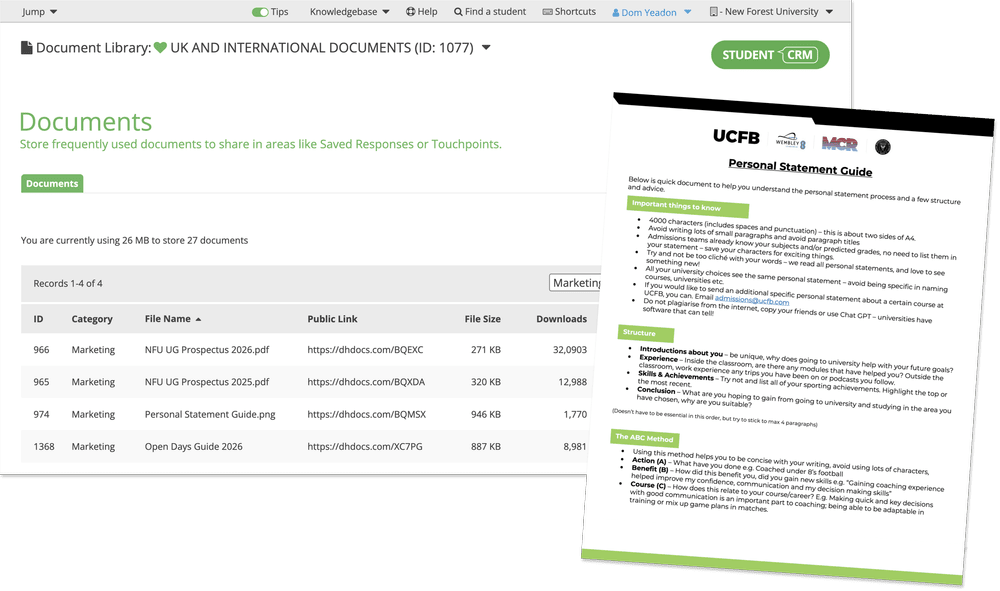
Document Library is a Student CRM module that helps universities and colleges store, manage, update, share, and track recruitment documents from one central library. It creates smart short links for documents, keeps those links pointing to the latest version, supports public and private access, and shows download activity so teams can see which materials are being used.
Everything you need to manage shared documents efficiently
Time-saving automation
- Upload a new file version and all short links update instantly.
- No re-sending or re-embedding; materials stay fresh automatically.
- Keep links current across Campaign Manager, Enquiries, and other student communications.
Easy sharing
- Each file creates a short, trackable link, such as dhdocs.com/AB12.
- Use links in emails, buttons, forms, event communications, or webpages.
- Share brochures, guides, maps, prospectuses, and application documents without attaching files repeatedly.
Unlimited storage
- Store unlimited documents up to 50MB per file.
- Supports PDF, DOC, PPT, XLS, CSV, JPG, PNG, and GIF.
- Keep key recruitment, admissions, outreach, and event materials in one place.
Smart permissions
- Public: create links anyone can access.
- Private: restrict files for internal use only.
- Control which documents are student-facing and which stay internal.
Performance insights
- See download counts and visual charts with timestamps.
- Identify popular materials and refine your content strategy.
- Understand which documents are being used by students, applicants, or agents.
Connected consistency
- Updates reflect automatically across campaigns, forms, and emails.
- Maintain consistency from one central library.
- Support connected workflows such as Prospectus Requests, Applications Active, and Event Manager.
Document Library FAQs
Common questions about using Document Library to store files, create smart document links, update document versions, control access, and track downloads inside Student CRM.